
Skip to content

Common Questions

We value your business!

Answers


How do I add a new client?

There a two different ways to add a new client or prospect. 

  1. Click "Add new client" or "Add new prospect" from the Dashboard - this will NOT send them an email. Please either personally invite them to a meeting to run an assessment with a phone call or a message from your secure email provider.
  2. Send an "Invite to Discover Link" to your client or new prospect - Copy the link from the bottom of your dashboard and email your business owner prospect or client your specific link with clear instructions. Do NOT try to copy this secure link from a URL in your browser.

To learn more about how to add a new client review this article.


How do I send the Discover Assessment to a business owner?

While the best practice is still considered running the Discover Assessment with your business owner client, it is possible to send them the 'Discover Link' to complete independently.
  1. As usual, sign into your ValuCompass account.
  2. Navigate from your ValuCompass dashboard to the "Marketing" tab found at the top of your screen.
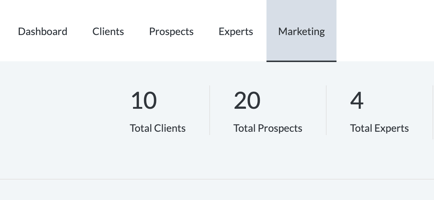
    Screenshot 2026-02-11 at 2.16.52 PM
  3. Under the button that says "Start Discover" you will want to "Copy Discover Link".
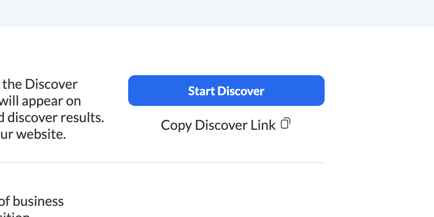
    Screenshot 2026-02-11 at 2.17.06 PM

  4. Once you have copied the link to your computers RAM (it will say "Copied to Clipboard!") you can paste it where you want; a webpage, social media page, or an email.
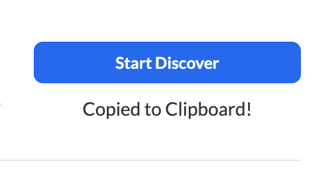
    Screenshot 2026-02-11 at 2.17.22 PM
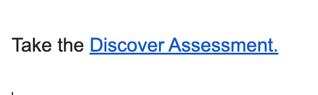
  5. No matter where you decide to paste your Discover Link you will want to embed the ugly looking link into more professional-looking text (such as these examples):
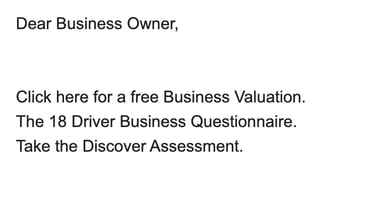
    Screenshot 2026-02-11 at 2.20.09 PM
  6. Then you are all set to send out your Discover Link!
    Screenshot 2026-02-11 at 2.35.15 PM

    Anyone who completes the Discover Assessment will show up in your Prospects section on your Dashboard. You will also get an email notification that they have completed the assessment. 

    Keep in mind that the Discover Assessment will yield the best results with business owners who recognize where the link is coming from - due to the sensitive information that is being asked.

    Note: If no email address is entered then the assessment will not register as "started".  Everyone who completes the Discover Assessment automatically will be able to view the report!


How is Enterprise Value calculated?

Operational performance -- What a company 'does' to generate revenue and profit.  On the surface, ValuCompass is an elegantly simple tool. Underneath, are complex algorithms,  vetted by thousands of businesses, advisors, and academics over 30 years. The result gives companies the data and tools necessary to build sustainable and transferable Enterprise Value. 

Click here for a one-page document on Enterprise Value

How ValuCompass Works

Business owners provide basic information about their company including industry type, annual revenue, and profit.  Next,  we ask a series of questions around 18 Value Drivers so we may compare the company’s status relative to best practices.  This is what we call a Discover

Each level of  ValuCompass asks more detailed questions about the Value Drivers. In all, we offer a 239‐point assessment.  Scores are applied and ratings are calculated, based on the answers provided. We then plot the company’s Enterprise Value and compare it against an industry norm to create a value gap. This identifies a company's strengths, risks, and vulnerable areas,  and how much value is being left on the table due to operational and market efficiencies. 

Our algorithms measure the risk to future revenues presented by the company's current operational processes and procedures and calculate  Enterprise  Value for the company based on that risk.  ValuCompass then calculates the increase in  Enterprise  Value that can be realized if operational performance is improved and risk lowered.  

Red Flags identify those risks which may prevent the monetization of some, or all, of the company’s Enterprise Value.   Tasks are suggested to further strengthen performance and value and reduce risk. 

Talking Points: The algorithms are based on research at the Massachusetts Institute of Technology (MIT), the premier engineering university in the US,  and proven in the market for over 30 years. The research includes the development of a set of private business standards (think GAAP for Operations) that are recognized as 'best practices' for each of the 18 areas measured. CoreValue's patented methodology has been used with over ten thousand companies to capture and grow $7B+ in Enterprise Value. The algorithms can be broadly explained as comparing the respondent company's due diligence performance with the due diligence checklists from approx. 5,000 closed transactions. CoreValue benchmarks the subject company against the real world. Vetted by hundreds of professionals, including top US bank Morgan Stanley, Mass Mutual, the NACVA and one of the nation’s leading valuation teams, Business Valuation Center, the algorithms have proven accurate and the methodology is accepted as effective. Our algorithms focus on operational performance, and a company's ability to prove it will produce and increase financial output ‐ revenues, profits - into the future, just as due diligence does. In contrast, straight valuation algorithms use only financial data (yesterday's performance) to give a number that is largely dependent on its purpose (e.g., divorce settlement, tax valuation, estate planning).

The ValuCompass 'Enterprise Value' is not a substitute for a formal financial valuation; it is intended as a guide for the owner to enable better planning, strategy, and tactical execution in pursuit of growth opportunities and building value into the company.

Communicate the ValuCompass Process

A critical part of securing successful engagements with business owners is begin able communicate your process and the value you will deliver in a clear and concise manner.

Below is a sample script that helps communicate your value, and the value of the ValuCompass process. Take this sample, make it your own, and practice it so that you are ready whenever an opportunity arises!


Sample Scripts
Owner/Other Professional:

What do you do?

Advisors (Example):

We help private business owners protect what they have built so they can grow and transition their business on their terms.

Owner/Other Professional: 

That is interesting, what is your process for doing that?

Advisor (Script – Short Version):

We go through a series of assessments that starts be getting an estimate of today’s value of your business and connects that business asset to you personally. We then dive deeper into your business and look at how the business as an asset connects to your personal financial planning to ensure that you're protected, your family is protected and that your business and personal planning goals are fully integrated for success.

Advisor (Script – Long Version):

The first step is for us to have a conversation about your business and your goals. To do that, I use a simple assessment - It's about 20 questions. From the assessment we will get an understanding of today's value of the business, the potential future value of the business, and what areas of the business are strong and the areas that may require some attention to improve the business value.

If we are the right fit for you, the next step is to engage in an integrated business and personal planning process. In that process, we take a deeper dive into the business to understand some actionable items that can help improve the value. We also look at how the business as an asset connects to your personal financial planning to ensure that you're protected, your family is protected and that your business and personal planning goals are fully integrated for success.

This planning process creates a roadmap for our continued work together to ensure we make decisions that connect your business planning to your personal planning and that we protect what you have worked hard to build.


How do I update my credit card?

It happens... whether your card has expired or you simply need to change the payment information for your subscription things change. Since ValuCompass does not store your credit card information you'll have to contact us directly.

But we can easily jump on a call and safely enter your new your credit card information within our payment processor.

As with most matters of finance and money, we want the situation handled carefully and securely. For this reason, please do not email or text any of your personal information.

Please reach out to support (either via an email message or using our support desk phone number) and one of our support team members will get back to you shortly.


How does the ValuCompass algorithm work and how do we know?

Our algorithms measure the risk to future revenues presented by the company's current operational processes and procedures and then calculate Enterprise Value for the company based on that risk. ValuCompass uses dollars as the yardstick to help business owners understand, manage, and monitor the intangible drivers behind their business. Thus its ability to perform, be sustained, and ultimately be transferred for the benefit of the owner, employees and community.

There is more than one algorithm powering ValuCompass: We know the algorithms work because outside valuation experts have thoroughly vetted them. When compared with formal financial valuations, ValuCompass enterprise value estimates are within 5---10%. But ValuCompass (unlike financial valuations), also measures the drivers of enterprise value. This means that we are looking into the future of operational value through the lens of best practices instead of just using historical data.

For a more in-depth look at how our algorithm is compluted see our Enterprise Value Explained document.


How do I delete a client or prospect?

If you know how to "update" a business owner from your dashboard, then removing them from your dashboard is easy. Though be careful. You aren't really deleting this business owner. Since our system is based on emails, we store every business owner in our private database. So you aren't actually deleting them - just removing them from your dashboard.

From your Client tab, find the edit button to the right of the business owner you want to remove:

  Screenshot 2025-10-23 at 3.13.57 PM

From your Prospect tab, click on the three little dots at the far right of the prospect you want to remove:
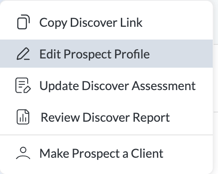
   Screenshot 2025-10-23 at 3.14.27 PM

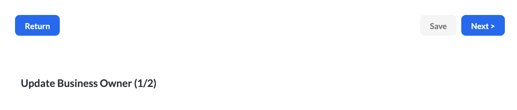
Then navigate to page two of the "Update Business Owner by clicking "Next":
  Screenshot 2025-10-23 at 3.13.31 PM

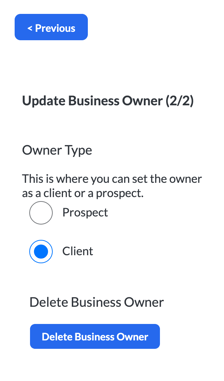
From page 2, you can select the "Delete Business Owner" button:
      Screenshot 2025-10-23 at 3.13.41 PM

Again, this will remove this business owner from your dashboard but it will not delete them from our system. 


Watch this video to see how it's done: Deleting a Business Owner


What is the "Diligence" Score?

The Diligence score measures your continued participation in the ValuCompass business assessment process. It always starts at C+ for all participants on the Discover Assessment and improves incrementally as you complete follow‑up assessments (such as Protect and Grow), reflecting your sustained effort towards growing and understanding your business.


How do I run an Align Report?

The Align Report is designed to focus the energy and direction of a business. This is especially important for businesses with multiple owners or large management teams. The detailed report produces honest feedback from executive team members, showing owners a way to best move forward and make the most pertinent decisions.

How does it work?
The Align Report takes the input from multiple Discover Assessments taken by individuals with a business. It presents the collected findings, comparisons, and observations in a single report. The goal is to highlight the similarities and differences of team members regarding their view of the business in an open and honest environment.  The Align Report can also be set up anonymously for team member privacy.

The Align Report Process

  1. Discuss this invaluable upsell with the primary business owner then follow the steps below - use the Align Report one-pager or a copy of generic Align Report  to help with this conversation. 
  2. Notify our Support Team and begin the Align process by emailing ValuCompass Support the list of names and email addresses of additional owners or top level management members who you wish to include in the Align report (use 3-7 members for best results). 

  3. Then share your advisor's Discover Link (found under the Marketing tab on your ValuCompass dashboard) with all the business team members and agree on a timeframe for them to complete it.

  4. Once all members of the business team have completed the Discover Assessment, notify the ValuCompass Support team and they will compile the report within three days.

  5. Discuss the results with the Business Owner and propose a time to review the findings with the business owner's full team meeting. Focus the meeting on what's currently working within the business, where there is a lack of communication (causing misalignment), and the specific drivers that need attention (based on combined assessment results).


Reach out

If you can't find what you are looking for, reach out and one of our team members will get back to you soon.